มี Docker setup ที่ Official Frappe Maintain อยู่ แต่มันค่อนข้างซับซ้อน ซึ่งก็เข้าใจได้ เพราะมันพยายามรองรับหลาย use case ถ้าเราเข้าใจ setup นี้จริงๆ ก็ไม่มีข้อสงสัยเลยว่ามันเชื่อถือได้และพร้อมสำหรับ production
แต่สำหรับเรา เราต้องการ setup ที่เรียบง่าย ตรงไปตรงมา แต่ยังคงประสิทธิภาพและความเชื่อถือได้
ทำความเข้าใจ Frappe Images
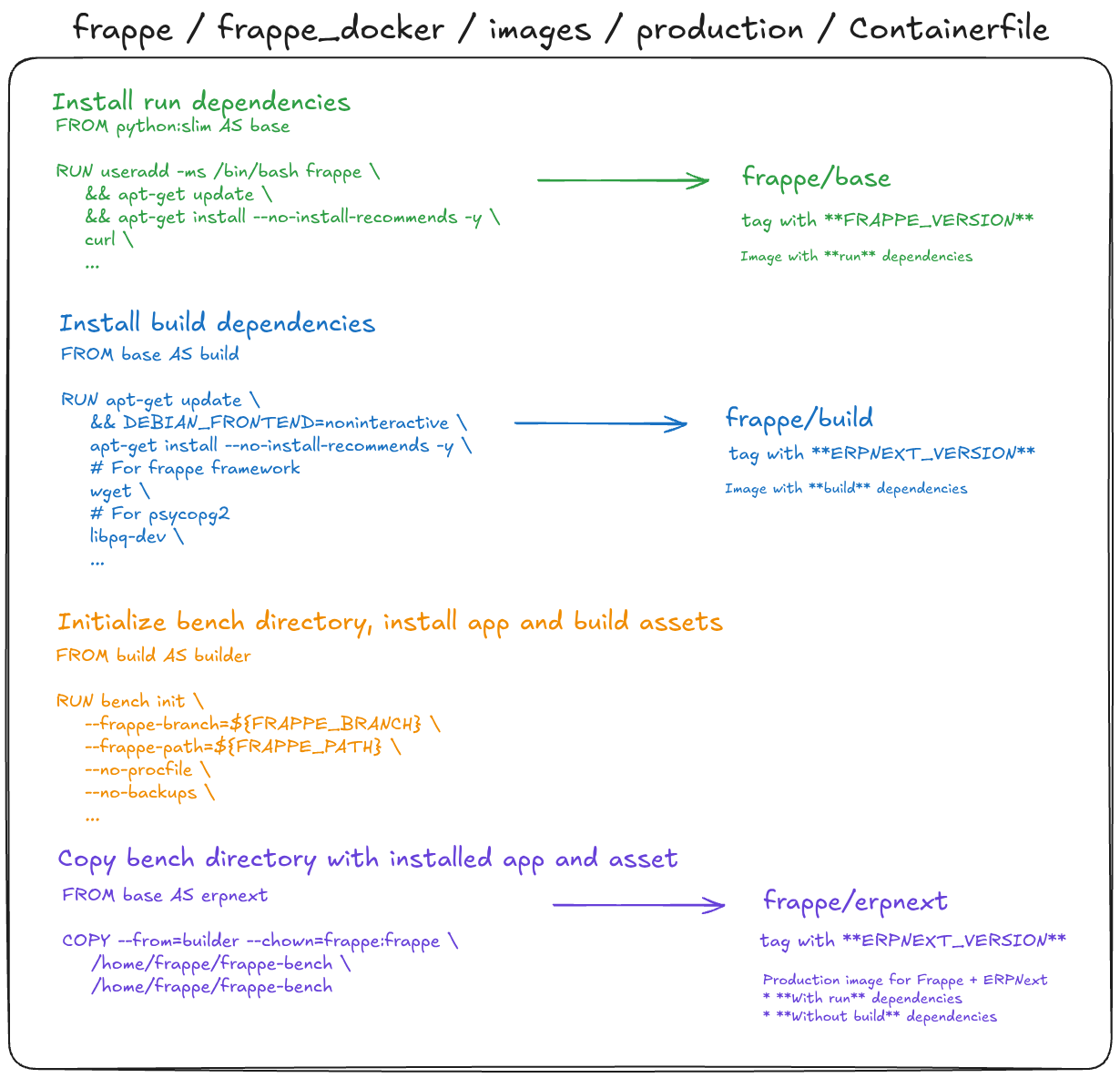
Frappe publish pre-built images ไว้บน Docker Hub ทั้งหมด 3 images แต่ละอันมีวัตถุประสงค์ต่างกัน:
- frappe/base - Image ที่มีแค่ run dependencies
- frappe/build - Image ที่มีแค่ build dependencies เพิ่มเติมจาก base
- frappe/erpnext - Image ที่มี run dependencies + ติดตั้ง Frappe & ERPNext ไว้แล้ว
| Image | Tagged ด้วย | Run Deps. | Build Deps. | Apps Frappe & ERPNext |
|---|---|---|---|---|
| frappe/base | FRAPPE_VERSION | ✅ | ❌ | ❌ |
| frappe/build | ERPNEXT_VERSION | ✅ | ✅ | ❌ |
| frappe/erpnext | ERPNEXT_VERSION | ✅ | ❌ | ✅ |
สำหรับ production image เราต้องการแค่สองอย่าง: run dependencies และ installed apps ส่วน build dependencies จำเป็นแค่ตอน build เท่านั้น ไม่ควรเอาไว้ใน final image เพราะมันทำให้ image ใหญ่โดยไม่จำเป็น
มีหลายวิธีในการ build production-ready image:
- Frappe Official Production Images - สร้าง image
frappe/erpnextที่ Frappe build และ push ขึ้น Docker Hub ส่วนfrappe/baseและfrappe/buildเป็น helper images ที่ใช้ระหว่าง build - Frappe Official Layered Images - สร้างโดยใช้
frappe/buildเป็น builder stage แล้ว copy app artifacts ลงในfrappe/baseimage ที่ clean - Frappe Official Custom Images - เกือบเหมือนกับ production image ใช้เมื่อต้องการ customization ในระดับสูง
โดยสรุป กระบวนการ build มีขั้นตอนดังนี้:
- เริ่มจาก
python:slimติดตั้ง run dependencies บันทึกเป็นbase - จาก
baseติดตั้ง build dependencies บันทึกเป็นbuild - จาก
buildinitialize bench และติดตั้ง apps - โฟลเดอร์ bench คือ build artifact ที่จะ copy เข้า base image - จาก
basecopy โฟลเดอร์ bench artifact เข้า image - นี่คือ final production image
แนวทาง multi-stage นี้ช่วยให้ final image มีขนาดกระทัดรัด เพราะทิ้ง build tools ทั้งหมดหลังจาก compile และติดตั้ง apps เสร็จแล้ว
รายละเอียดทางเทคนิค
Dockerfile สำหรับทั้งสาม images อยู่ใน images/production
มันถูก triggered โดย docker-build-push.yml ซึ่ง workflow ใช้ docker/bake-action ซึ่งจะอ่านไฟล์ docker-bake.hcl เพื่อกำหนดสิ่งที่จะ build
ใน docker-bake.hcl นั้น เราจะพบ Dockerfile targets และ image tags สำหรับแต่ละ image variant
Image ของเรา
ทำไม?
Frappe publish official images อยู่แล้ว แล้วทำไมเราถึงต้องสร้างอีกอัน?
Build time ที่เร็วขึ้นสำหรับ custom image
เมื่อเราต้องการเพิ่ม custom app บน ERPNext ถ้าใช้ Official Image เราต้อง re-initialize bench และ reinstall Frappe & ERPNext ใหม่ทุกครั้งที่ build - การ initialize bench และติดตั้ง app แต่ละครั้งใช้เวลาหลายนาที
Image ของเรา pre-bake การ initialize bench และการติดตั้ง Frappe & ERPNext ไว้ใน base ที่นำมาใช้ซ้ำได้ การ build custom image จะต้องทำแค่การติดตั้ง custom app เพิ่มเติมเท่านั้น ซึ่งเร็วกว่ามาก
จุดเริ่มต้นที่ชัดเจนด้วย version ที่ระบุไว้
ด้วย version tags ที่ระบุไว้อย่างชัดเจน เราจะรู้แน่ชัดว่ากำลัง build บน Frappe และ ERPNext version ไหน ไม่มีความคลุมเครือเกี่ยวกับสิ่งที่อยู่ใน image
ข้อเสีย
ขนาด image ที่ใหญ่ขึ้น
Image ของเรามีขนาดใหญ่กว่า official image - ประมาณ 1 GB เทียบกับ official ที่ ~500 MB เนื่องจากเรารวม build dependencies เข้ากับ run dependencies และ installed apps
อย่างไรก็ตาม เราไม่ได้ใช้ image นี้โดยตรงใน production แต่ใช้เป็นแค่ builder stage ใน multi-stage Dockerfile เท่านั้น final production image สร้างโดยการ copy โฟลเดอร์ bench จาก image ของเราลงใน frappe/base ที่ clean ดังนั้น final size จึงใกล้เคียงกับ official image
| Image | Tagged ด้วย | Run Deps. | Build Deps. | Apps Frappe & ERPNext |
|---|---|---|---|---|
| thspacecode/erpnext-docker | FRAPPE_ERPNEXT_VERSION | ✅ | ✅ | ✅ |
Image
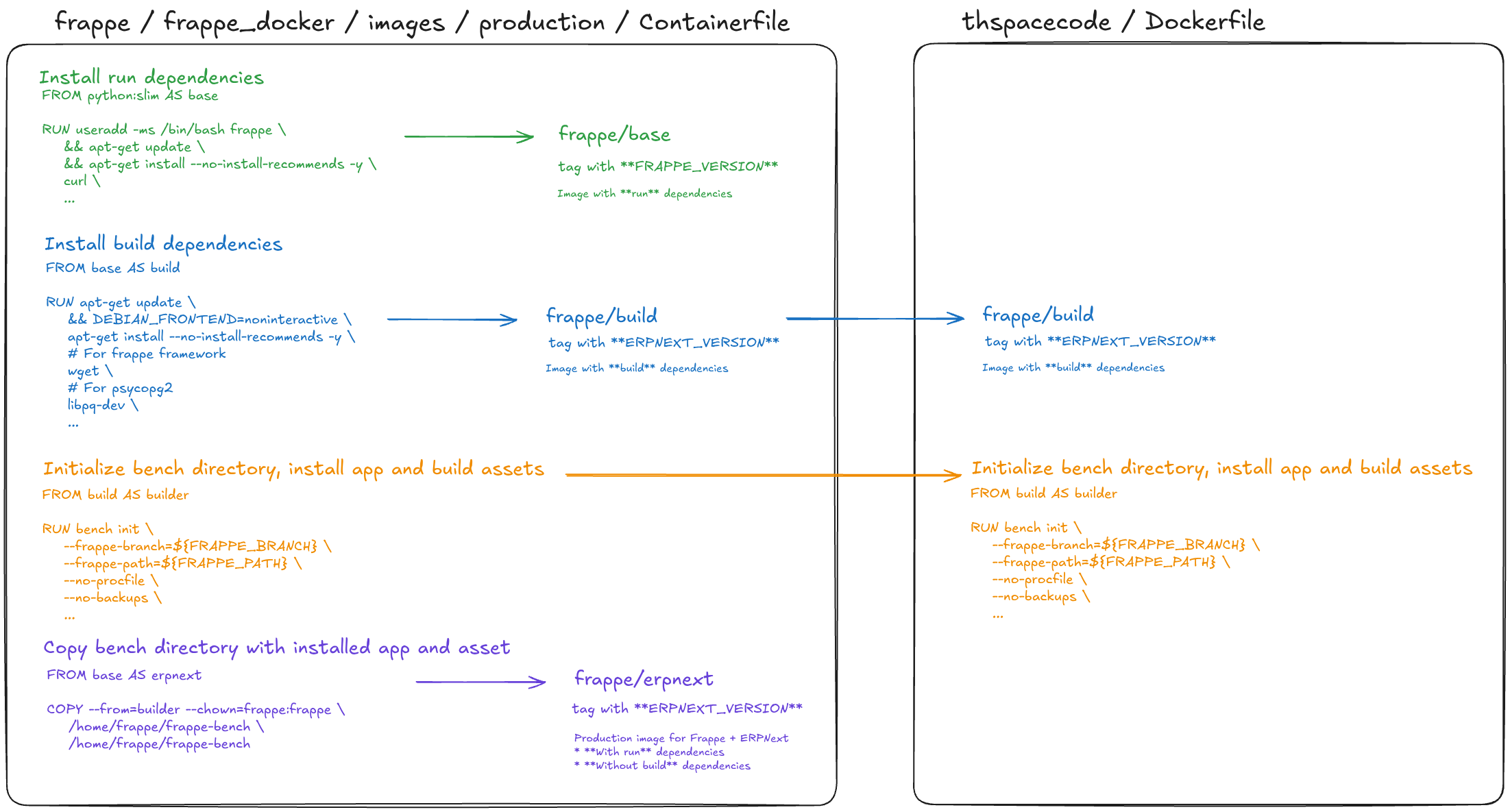
โดยอ้างอิงจาก official image เรา initialize bench และติดตั้ง Frappe & ERPNext จากนั้น run การทดสอบอย่างง่ายเพื่อยืนยันว่า image สามารถเริ่ม web service ได้ แล้ว push ผลลัพธ์ขึ้น Docker Hub สิ่งนี้มอบ base ที่เชื่อถือได้และ pin version ไว้ให้การ build custom app สามารถเริ่มจากตรงนี้ได้ โดยไม่ต้องทำ setup ที่ช้าซ้ำทุกครั้ง