In ERPNext and the Frappe Framework, document lifecycle hooks allow developers to control the behavior of a Document at various stages like save, submit, cancel, or update.
I use the terms Hooks, Events, and Methods somewhat interchangeably, they all refer to the same idea: injecting logic into specific moments of the document lifecycle.
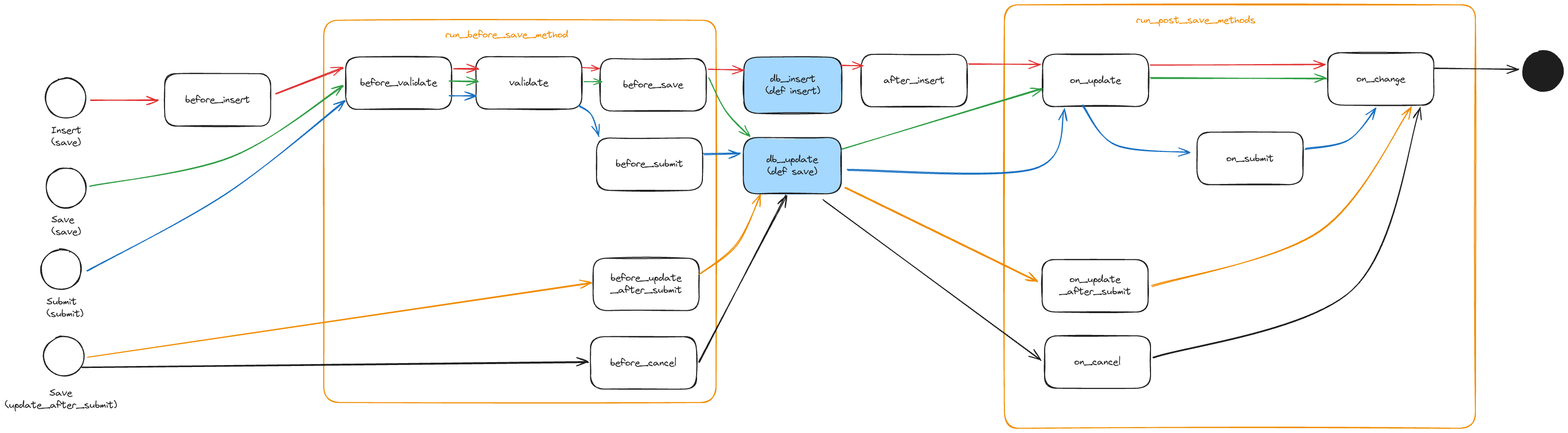
Each event is triggered based on the initiating action: save, submit, cancel, or update.
⚠️ Important: If you modify the document (or another document) after
db_insertordb_update, those changes won’t persist automatically. You must explicitly callfrappe.db.commit()
Usage
Custom Document
To define your own controller for a custom DocType you’ve created, subclass from Document and implement any hooks you need:
import frappe
from frappe.model.document import Document

class Person(Document):
    def validate(self):
      self.mark_as_worlds_best_boss()

    def mark_as_worlds_best_boss(self):
      if self.name == "Michael Scott"
        self.is_worlds_best_boss = True
Frappe will automatically call your validate() method at the appropriate point in the save lifecycle.
Attatch to Standard Document
If you want to add logic to standard ERPNext DocTypes (e.g. Sales Order, User, etc.), use hooks.py in your custom app:
doc_events = {
	"User": {
		"validate": "dunder_mifflin.utils.doc_events.mark_as_worlds_best_boss",
	},
}
Then define the method like this:
def mark_as_worlds_best_boss(doc, method):
    if doc.name == "Michael Scott":
        doc.is_worlds_best_boss = True
Reference