As I was looking for an omni-channel chatbot for my coffee marketplace company cafn.co, my first requirement was open source - I wanted to tinker with the chatbot workflow and automate things my way.
Most open-source omni-channel tools follow the freemium model: a free tier with paid features locked behind a subscription. Then I stumbled upon Raven, an open-source messaging platform built on the Frappe web framework. It looks great, supports both web and mobile, includes AI capabilities, and has no paid tier - which is exactly how Frappe and ERPNext have always operated.
That got me thinking: omni-channel chat is really just a chat app that can send and receive messages from multiple external channels. It should be straightforward, right?
So I set out to add omni-channel chat support to Raven. My first instinct was to build a separate app, but I decided against it.
Decision Not to Build a Separate App
- Raven doctypes need modification to support omni-channel - a separate app would require either monkey-patching or forking Raven anyway.
- The UI needs significant customization on both the web and mobile sides of Raven.
- Omni-channel and messaging share most of the same logic - they are both fundamentally chat apps that accept and push messages. Splitting them into two apps would mean duplicating a lot of utilities and functions with no real benefit.
Omni Channel Chat Definition
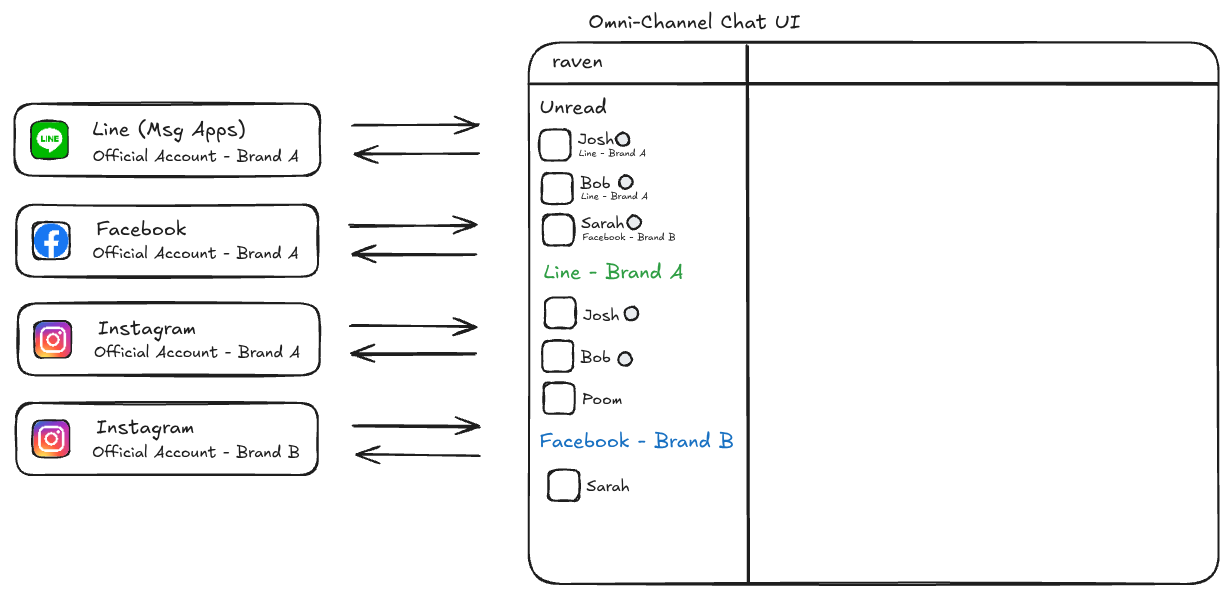
Omni-channel chat means having a single, central UI where your team can manage conversations from multiple official channels - think WhatsApp Business, LINE OA, Facebook Messenger - all in one place.
What it does NOT include are things like connecting Microsoft Teams to Raven or linking a personal LINE account. The scope is specifically official business channels feeding into a unified inbox for your team.
Overview Architecture
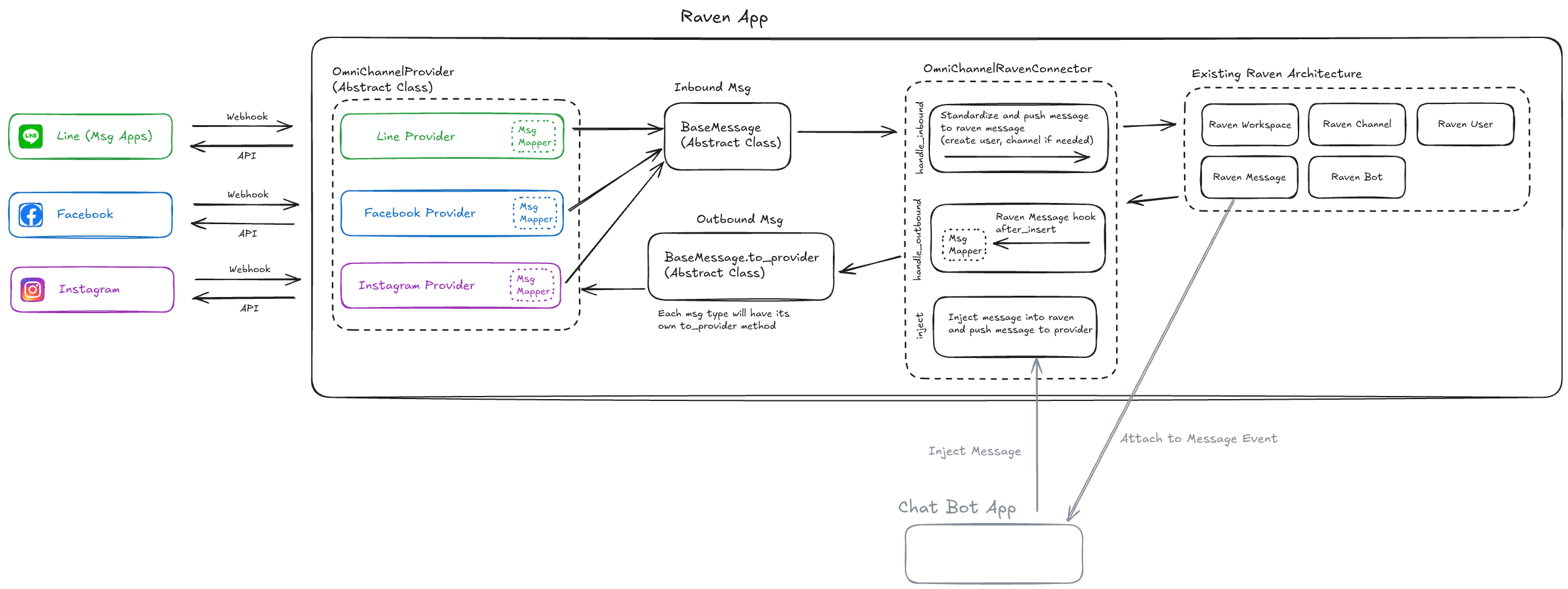
There are four main components.
OmniChannelProviderConfig
A Frappe doctype that stores API keys and secrets for each chat provider. This is the configuration layer that the provider classes read from.
OmniChannelProvider
The interface for interacting with a specific chat provider using a standard message format.
Its responsibilities:
- Inbound: receive a raw message from the provider, convert it to a standard message, then hand it off to any registered callback (in our case, pushing it to Raven via OmniChannelRavenConnector).
- Outbound: expose an interface for sending a standard message to the provider.
Simplified code:
class OmniChannelProvider(ABC):
  @abstractmethod
  def handle_webhook(self, callback: Callable):
    """Extract data from incoming web hook."""

  @abstractmethod
  def send_message(self, destination_id: str, std_message: StdMessage):
    """Send an outbound message."""

  # ...(and more)
OmniChannelRavenConnector
The interface between the standard message layer and the Raven system.
- Inbound: receive a standard message and save it as a Raven Message doctype, creating all related doctypes if they do not exist yet (Raven Workspace, Raven Channel, etc.).
- Outbound: attach to the Raven message doctype, build a standard message from the Raven Message doctype, and call the provider to deliver it.
Simplified code:
class OmniChannelRavenConnector:
  def handle_inbound(self, destination_id: str, sender_id: str, std_message: StdMessage):
    # ...(saving msg into Raven Message)

  def handle_outbound(self, raven_message: RavenMessage):
    # ...(convert Raven Message into standard message and push to provider)
Standard Message
A standardized message format that every provider implementation uses. Each message has a to_provider method that providers call to convert it into their own format.
Simplified code:
class StdMessage(ABC):
  @property
  @abstractmethod
  def provider_mapping(self) -> dict["ProviderType", Callable[[], dict]]:
    """Mapping of provider to a callable that converts the message to the provider format."""

  def to_provider(self, provider_type: "ProviderType") -> Any:
    if provider_type not in self.provider_mapping:
      raise NotImplementedError("Provider not implemented.")

    return self.provider_mapping[provider_type]()

class TextMessage(StdMessage):
  def to_line(self):
    return LineTextMessage(text=self.text, sender=self.build_line_sender())

  def to_facebook(self):
    return {"text": self.text}

  @property
  def provider_mapping(self):
    return {
      "line": self.to_line,
      "facebook": self.to_facebook,
    }
Steps to Support a New Provider
- Add provider-specific fields to
OmniChannelProviderConfig - Create a new provider class that inherits from the provider abstract class
- Update the
to_providermethod on the base standard message if needed
What About AI?
You said you wanted to build a chatbot - why did you end up building omni-channel chat instead?
Getting an AI to respond to an incoming message is actually the easy part. Things get tricky fast once you are building something production-ready.
- Chat history - You need to manage and pass conversation history to the AI on every request. Without it, the AI only sees the latest message and responds without any context, which makes it largely useless for real conversations.
- Bot permissions and context - You need to scope what the bot can access and do. Frappe helps here since you can use its doctype permission system to define what the bot session can access, but you still need to think carefully about which tools and context to expose.
Building omni-channel first gives the AI a reliable message pipeline to plug into. Once messages from any channel flow cleanly through a single system, wiring in AI responses becomes a much simpler and more contained problem.
How to use
This app is still in beta, so expect some rough edges.
- Install the SpaceCode | Raven app
- Add Raven Workspace, check
Is Omni-Channel Workspace - Add Omni-Channel Chat Provider
- Done!
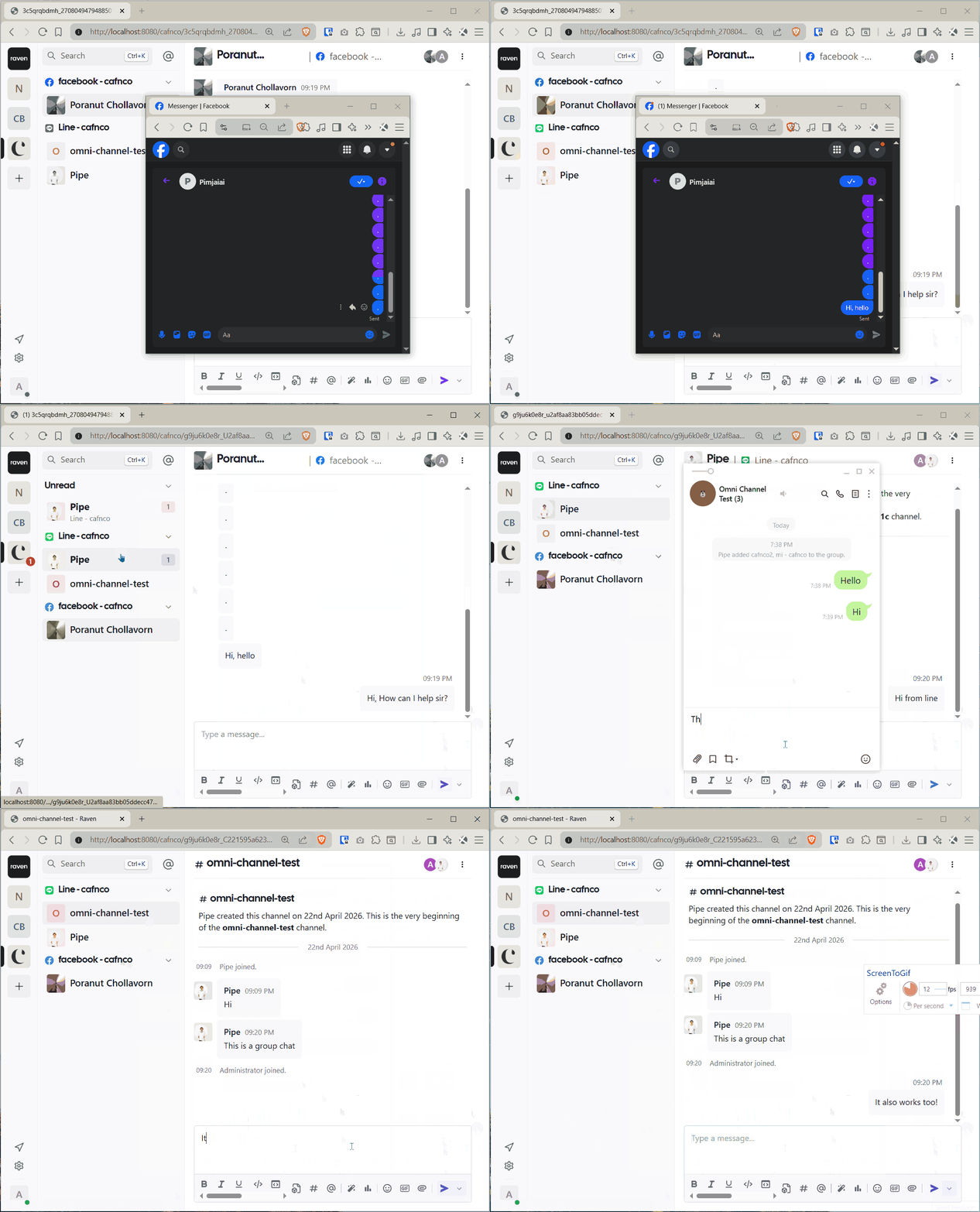
App demo
Use Cases
- Use AI to answer FAQs with vector search
- Add an AI workflow to handle customer reservations
- Use AI integrated with ERPNext to answer price-related questions in real time
Source Code
The full source code is available on GitHub. Feel free to explore, fork, or contribute thspacecode/raven.