Frappe (the framework behind ERPNext) is a full-stack web application platform that bundles a web server, background job workers, a scheduler, WebSocket support, and several supporting services into a cohesive deployment unit. Understanding how these pieces fit together is essential before you run Frappe in production - whether on a bare-metal server, a VM, or a container cluster.
This post walks through four key architectural concerns:
- Persistent Storage - what data needs to survive a restart and where it lives
- Service Overview - every process that runs and how they talk to each other
- Domain Name Routing - how Frappe maps an incoming HTTP request to the right site
- Frappe Site Folder Layout - the directory structure inside
~/bench/sites
Persistent Storage
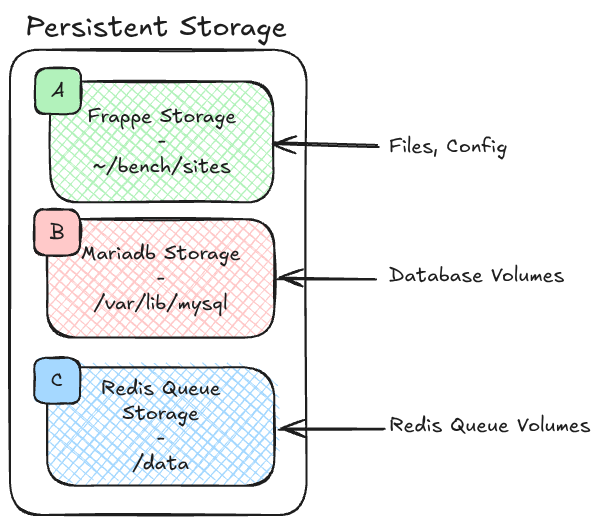
Frappe has exactly three persistent storage locations that you must preserve across deployments and container restarts.
| Label | Storage | Default Path | What It Holds |
|---|---|---|---|
| A | Frappe Storage | ~/bench/sites | Site files, uploads, private files, and per-site configuration (site_config.json) |
| B | MariaDB Storage | /var/lib/mysql | All relational data - DocTypes, transactions, user records, etc. |
| C | Redis Queue Storage | /data | Persistent job queues (background tasks that survive a Redis restart) |
Why this matters in practice
When you run Frappe inside Docker, each of these three paths must be backed by a named volume or a bind mount. Forgetting any one of them means data loss:
- Losing A (
~/bench/sites) wipes uploaded files and site configuration - your app may boot but be completely misconfigured. - Losing B (
/var/lib/mysql) is a full database wipe. - Losing C (
/data) drops any background jobs that were queued but not yet executed.
Redis Cache is intentionally excluded from this list - it is ephemeral by design. If the cache is lost the application rebuilds it automatically; there is no data-loss risk.
Service Overview
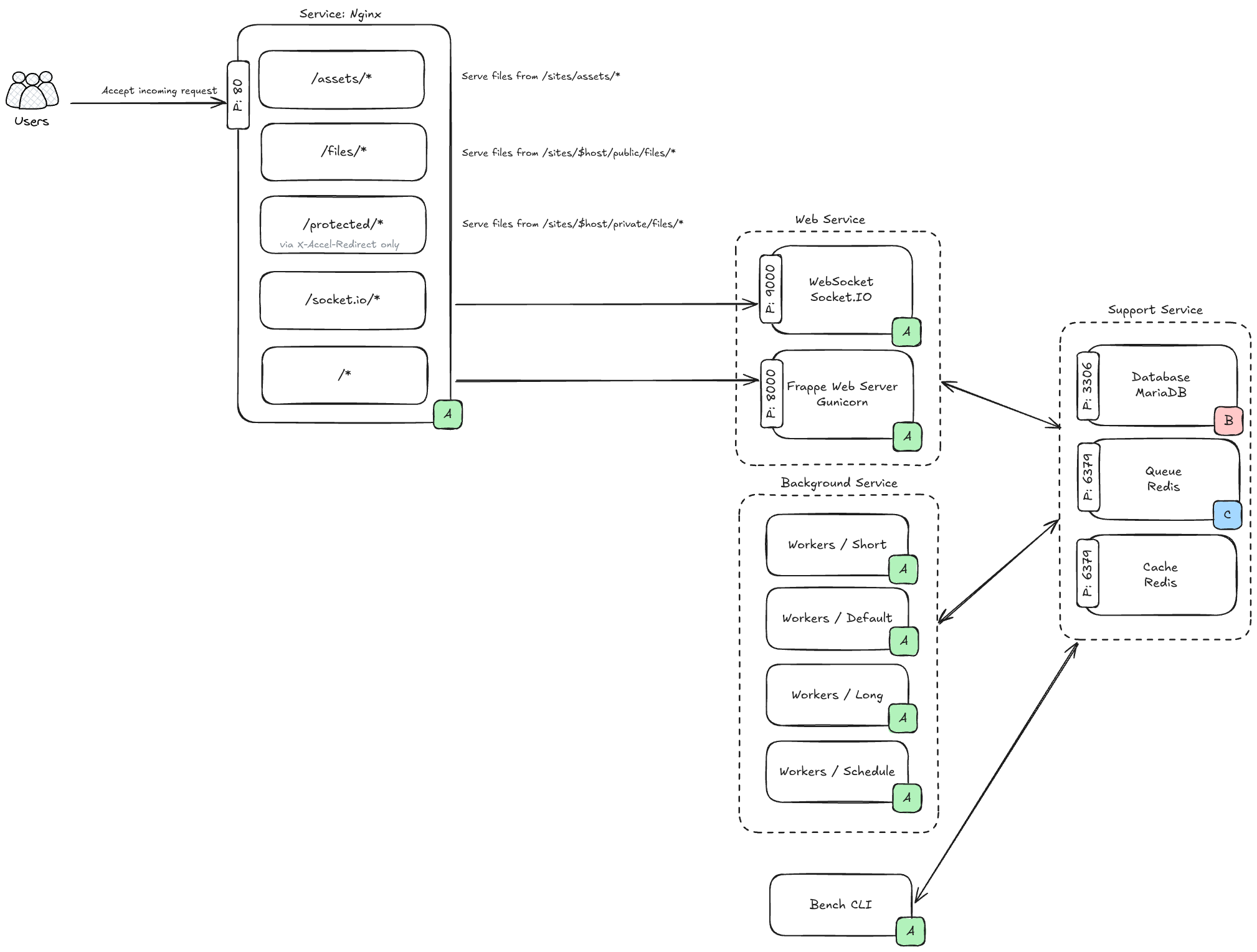
A production Frappe deployment is composed of several cooperating processes. The diagram above groups them into three categories.
Web Services
Nginx (port 80)
Command (Simplify): nginx
Nginx is the front door. Every request from the browser arrives here first. Based on the URL path, Nginx decides what to do:
| Path | Action |
|---|---|
/assets/* | Serve static files directly from ~/bench/sites/assets/ |
/files/* | Serve public uploaded files from ~/bench/sites/$host/public/files/ |
/protected/* | Serve private files from ~/bench/sites/$host/private/files/ (via X-Accel-Redirect - the Frappe web server authorises the request first, then Nginx sends the file) |
/socket.io/* | Reverse-proxy to the WebSocket service |
/* (everything else) | Reverse-proxy to the Gunicorn web server |
WebSocket / Socket.IO (port 9000)
Command (Simplify): node frappe-bench/apps/frappe/socketio.js
Handles real-time features: desktop notifications, form live-updates, print progress, and other push events. Clients open a persistent connection here; the Frappe web server sends events to this process when something changes.
Frappe Web Server / Gunicorn (port 8000)
Command (Simplify): frappe-bench/env/bin/gunicorn frappe.app:application
The main Python WSGI application. Every page render, API call, and form submission ends up here. Gunicorn spawns multiple worker processes to handle concurrent requests.
Background Services
Command (Simplify): bench worker / bench scheduler
Frappe uses a Redis-backed job queue to execute work asynchronously. There are four worker processes:
| Worker | Purpose |
|---|---|
| Short | Fast, lightweight jobs (sending a single email, updating a cache entry) |
| Default | Standard background tasks |
| Long | Heavy or long-running jobs (bulk imports, report generation, scheduled reports) |
| Scheduler | Reads cron-style scheduled tasks defined in each app and pushes jobs into the appropriate queue |
The Scheduler does not execute jobs directly - it only enqueues them. The Short/Default/Long workers pull from the queue and execute.
Support Services
| Service | Port | Role |
|---|---|---|
| MariaDB | 3306 | Relational database - the source of truth for all application data |
| Redis Queue | 6379 | Job queue - workers read from here |
| Redis Cache | 6379 | Application-level cache - speeds up page loads and repeated queries |
Note: Redis Queue and Redis Cache typically run as separate Redis instances (different ports or different container services), even though both use port 6379 by convention. Check your
common_site_config.jsonfor the actual addresses.
Bench CLI
bench is the command-line tool used to manage the entire Frappe installation - creating sites, installing apps, running migrations, and starting/stopping services. It is not a long-running daemon; it is used interactively by administrators.
Site Domain Name: A Critical Component for Production Setup
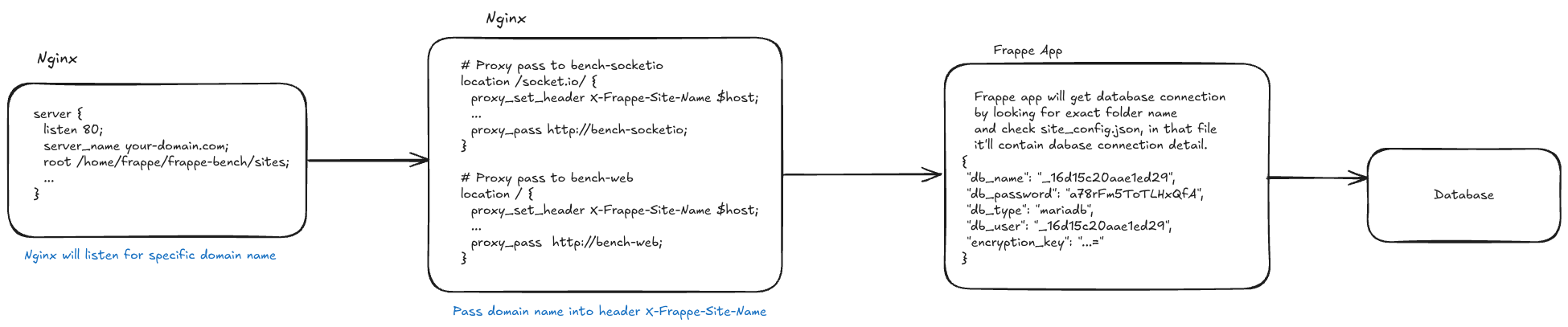
One of Frappe's most distinctive design decisions is that the domain name is the site identifier. A single Frappe bench can host multiple sites, and the domain name of the incoming request is what determines which site (and therefore which database) is used.
How it works
-
Nginx is configured with a
server_namematching the site's domain:server { listen 80; server_name your-domain.com; root /home/frappe/frappe-bench/sites; ... } -
Nginx injects the domain name into a custom HTTP header before forwarding the request:
# Proxy pass to bench-socketio location /socket.io/ { proxy_set_header X-Frappe-Site-Name $host; ... proxy_pass http://bench-socketio; } # Proxy pass to bench-web location / { proxy_set_header X-Frappe-Site-Name $host; ... proxy_pass http://bench-web; } -
The Frappe application reads
X-Frappe-Site-Nameand looks for a matching folder under~/bench/sites/. If a folder namedyour-domain.comexists, Frappe opensyour-domain.com/site_config.jsonto get the database credentials:{ "db_name": "_16d15c20aae1ed29", "db_password": "a78rFm5ToTLHxQfA", "db_type": "mariadb", "db_user": "_16d15c20aae1ed29", "encryption_key": "...=" }
Practical implications
- The folder name must exactly match the domain name that reaches Nginx. A mismatch (e.g.,
www.your-domain.comvsyour-domain.com) will cause Frappe to report that the site does not exist. - Because the domain is structural (it is a directory name), renaming a site requires migrating the folder and updating DNS and Nginx config.
Frappe Site Folder Layout
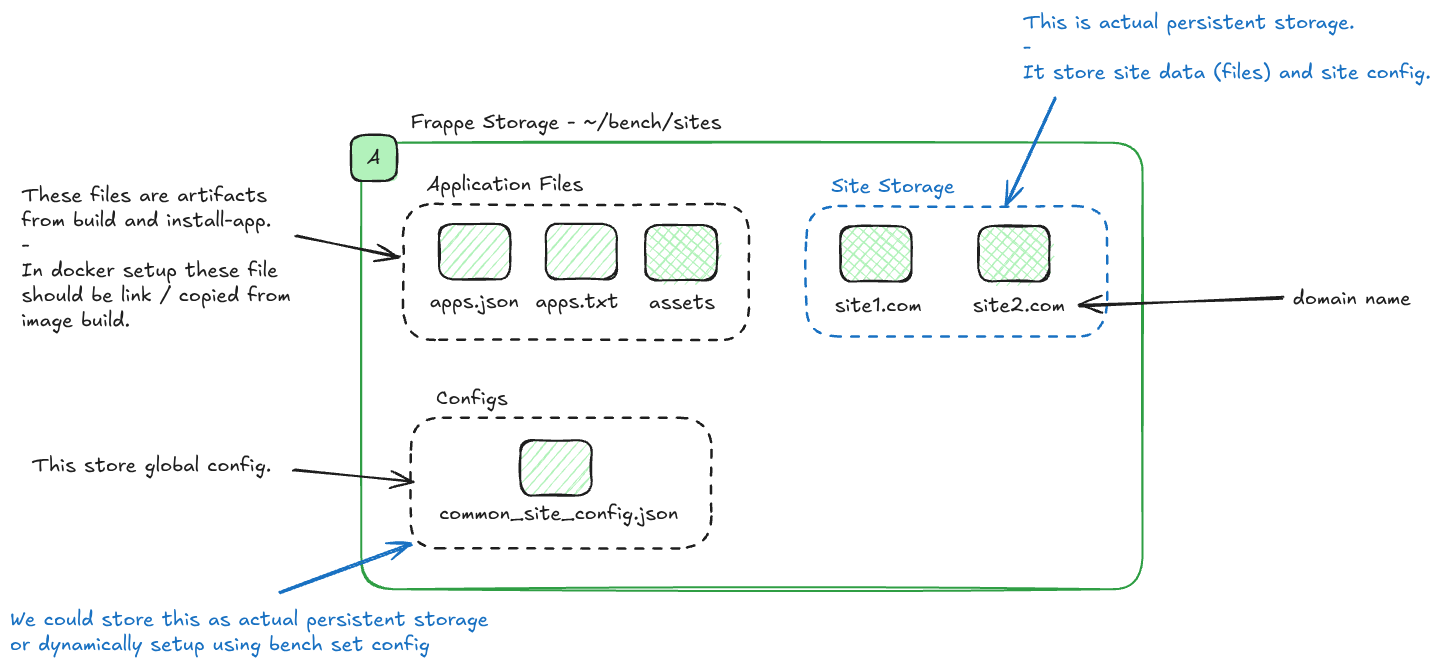
Everything under ~/bench/sites falls into two broad categories: application files (largely static artifacts produced at build/install time) and site storage (the true persistent data that is unique to each site).
~/bench/sites/
├── apps.json           # Metadata about installed apps
├── apps.txt            # Ordered list of installed apps
├── assets/             # Built CSS, JS, and other frontend artifacts
├── common_site_config.json   # Global configuration shared by all sites
├── your-domain.com/    # One folder per site
│   ├── site_config.json
│   ├── public/
│   │   └── files/      # Publicly accessible uploaded files
│   └── private/
│       └── files/      # Private uploaded files (requires auth to download)
└── another-domain.com/ # Another site
Application Files (apps.json, apps.txt, assets/)
These are artifacts from bench build and bench install-app. They are not user data; they are derived from the app source code. In a Docker-based setup, these files should be built into the image or copied/linked from the image at container startup - they do not need to be in a persistent volume because they can be reproduced from the source.
Global Configuration (common_site_config.json)
This file stores settings that apply to every site on the bench - Redis addresses, file size limits, developer mode flags, etc. You can manage it with:
bench set-config -g redis_queue redis://redis-queue:6379The -g flag writes to common_site_config.json rather than a specific site's config.
You can treat this file as persistent storage (mount it as a volume) or regenerate it dynamically at startup using bench set-config. The latter is common in container environments where configuration is injected via environment variables.
Site Storage (your-domain.com/)
This is the actual persistent storage for each site. It contains:
site_config.json- database credentials and site-specific settingspublic/files/- files uploaded by users that are publicly accessible (e.g., product images)private/files/- files uploaded by users that require authentication to access (e.g., salary slips, confidential documents)
This folder must be in a persistent volume. If it is lost, uploaded files are gone and the site loses its database connection details.
Summary
| Concern | Key Takeaway |
|---|---|
| Persistent Storage | Three volumes: ~/bench/sites, /var/lib/mysql, Redis /data |
| Services | Nginx → Gunicorn + Socket.IO, backed by Workers + Scheduler + MariaDB + two Redis instances |
| Domain Routing | Domain name = site folder name; passed via X-Frappe-Site-Name header |
| Folder Layout | assets/ is build artifact; your-domain.com/ is the only data you must persist |
Understanding this architecture makes it straightforward to design a robust deployment - whether you are writing a docker-compose.yml, a Helm chart, or a bare-metal Ansible playbook. The core invariant is always the same: keep the three persistent volumes safe, keep the domain name consistent, and let the services communicate on their designated ports.